Some plugins seem to crash Sushi when calling SessionController.SaveSession

Hello,

I am currently trying out the 1.2.1 raspberry pi image. Let me tell you guys how much the prebuilt plugins are appreciated. Also having Juicysfplugin pre-shipped with elk-plugin-extensions dynamic path loading is a game changer. So for starters thank you for this immense quality of life improvement.

However since it’s now easier to try out plugins it’s also easier to find issues with them. So I would like to report that so far all plugins shipped under /opt/plugins/vst that I tested seem to cause sushi to segfault when calling SessionController.SaveSession.

Here is a simple sushi config to reproduce the issue.

{
    "host_config" : {
        "samplerate" : 48000
    },
    "tracks" : [
        {
            "name" : "test",
            "channels" : 2,
            "inputs" : [],
            "outputs" : [
                {
                    "engine_bus" : 0,
                    "track_bus" : 0
                }
            ],
            "plugins" : [
				{
                    "path" : "/opt/plugins/vst/CreamCoat.so",
                    "name" : "drums_reverb",
                    "type" : "vst2x"
                }
            ]
        }
    ]
}

Let me know if you need more to investigate.
Best regards.

1 Like

Hi gni and welcome to the forums. Glad you appreciate Elk and thanks for the bug report. We will investigate.

Found the bug and fixed it. The fix will be included in the next release of sushi, in the meantime I pushed the latest develop to github GitHub - elk-audio/sushi at develop · GitHub if you want to give it a try yourself @gni

Hello.

I have finally found some time to test the fix and it works.

Had some trouble because in the meantime there was a update with a new dependecy on ZMQ that my Elk-SDK version did not know about, but after doing git checkout to commit 1574bc47 I got the patched binary compiled and running on my pi.

Well done and thank you.

Hello again.

I’m not sure whether I should be reporting this here and now because I’m currently using a version somewhere on the develop branch, and this may already have been fixed without me realizing it. If so, I apologize.

I found another weird quirk in SessionController : plugins default programs seem to be overwritten when restoring a session.

It is way easier to see it happen using python sushi-gui, so here are steps to reproduce and some screenshots.

  • Run Sushi and connect to it via sushi-gui
  • Add a plugin that has programs. I picked MDA Piano for the example but any plugin with programs should do it. As a reminder path for this plugin is /home/mind/plugins/mda-vst2/mdaPiano.so.
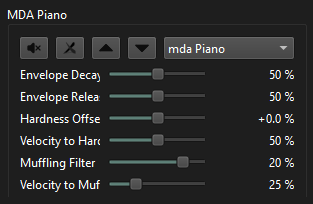
  • We now see MDA Piano default program : mda Piano. Notice its first param is set at 50%.
    image
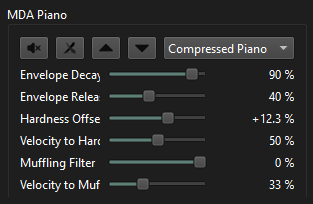
  • Now let’s switch to a different program : Compressed Piano. Notice first param is now set at 90%.
    image
  • Save the session
  • Restore the session (no need to even restart Sushi)
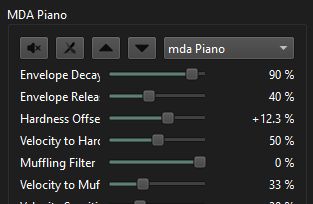
  • We now see the name of the default program mda Piano but with the parameters of the program we saved Compressed Piano
    image

It is not dramatic because we actually get the parameters we saved. So upon restoring session you may not even notice it happen.

However, suppose you need to revert back to the default program after restoring the session and this gets messy.

Some additional observation :

  • I made sure this is not sushi-gui being crazy by calling ProgramController.GetProcessorCurrentProgramName(...) from nodejs and also got the name of the default program.
  • VST3X and LV2 plugin seem to be able to recover from this. After entering this state, changing to another program and switching back to default program will reload the default program parameters.
  • VST2X will not. Even switching back and forth will reload the “wrong” program parameters.

Let me know if anything is unclear.

Kind regards.

1 Like

Appreciate your extensive testing gni.

I’m back from vacation and did some testing today and I think this is mainly an issue with MDA Piano. With MDA Piano (VST2) I get the behaviour you describe.

With JX10 and DX10 it don’t get the same behaviour. If I select a program, change some parameters, save and reload the session, I get the correct value of all parameters, i.e. the full state of the plugin. The program name is “wrong” in the sense that it doesn’t match the program that was set before saving. But then again, it isn’t that program anymore since some parameters were changed.
But selecting the same program again or selecting another program and then back to the original, will reload all parameters to match the program, not the saved state.

But with MDA Piano I do get some weird behaviour where the saved program seems to be changed forever if I load a saved state. It seems like the saved state overwrites internal programs in the plugins.

I’m not 100% sure about the specs (and vst2 documentation is not very extensive) but I feel it should be the responsibility of the plugin to store the last selected program. If a Vst2 plugin doesn’t implement its own state saving mechanism, Sushi will just store the values of all parameters. Not the last selected program. Maybe it could, but I’m not sure if that will have other implications so I’m a bit reluctant to changing that.

Hello Gustav,

After giving it more thought, I think you are right. Given the current implementation of programs, doing anything here would be equivalent to assigning a big responsibility to the host that may have unforeseen consequences later. Also saving and loading parameters is easily enough done with any high level language that can talk gRPC so I’ll probably end up doing my own implementation of program creation and recovery for my use case.

But as you may start to know me a little now, I always have a couple of other unexpected things to report:

1 - Small bug in AudioRoutingController

The gRPC method DisconnectAllInputsFromTrack() will not actually disconnect all inputs from a track, but only the first input found.

You can reproduce this with elk-py (sorry I am not great at python, but this is a very simple demo)

This was tested with sushi -r -c ~/config_files/empty.json

#!/usr/bin/env python3

import asyncio
from elkpy import sushicontroller as sc

async def main():
    
    controller = sc.SushiController()
    
    await asyncio.sleep(0.5) 

    # Get tracks 
    tracks = controller.audio_graph.get_all_tracks()

    # List all inputs of first track found
    inputs = controller.audio_routing.get_input_connections_for_track(tracks[0].id)
    print("inputs before deleting all : ", inputs)
    
   
    # Clear all inputs of track
    try:
        ev =  controller.audio_routing.disconnect_all_inputs_from_track(tracks[0].id)
        print("cmd id:", ev.id)
        res = await ev.wait()
    except Exception as e:
        print("Error disconnect_all_inputs_from_track")
        
        
    # re-list all inputs of track for verification
    inputs = controller.audio_routing.get_input_connections_for_track(tracks[0].id)
    print("inputs after deleting all (should be empty) : ", inputs)

    # should print an empty list, but return value is not empty.


asyncio.run(main())

And this is the result with the non-empty list :

ELKPY: Compiled proto found!
ELKPY: Sushi API match! -> 1.2.0
ELKPY: Asyncio context detected.
inputs before deleting all :  [{
 track: 0
 track_channel: 0
 engine_channel: 0
}, {
 track: 0
 track_channel: 1
 engine_channel: 1
}]
cmd id: 3
inputs after deleting all (should be empty) :  [{
 track: 0
 track_channel: 1
 engine_channel: 1
}]

Curiously, the disconnect_all_outputs_from_track() counterpart is working fine in that regard.

2 - SessionController seems to skip saving and reloading properties set with elk-plugin-extensions.

This one is a bit more painful for me because I always have to redo a manual input of soundfont path in JuicySFplugin.

It’s even easier to test if you have sushi-gui available

Just create manually the processor on the track using those args:

{
    "path" : "/opt/plugins/vst3/juicysfplugin.vst3",
    "name" : "test",
    "type" : "vst3x",
    "uid" : "juicysfplugin"
},

add the property path via UI (this must match an actual soundfont path somewhere on the disk)
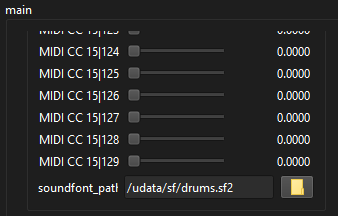
image

Save and reload session. Now property is gone:
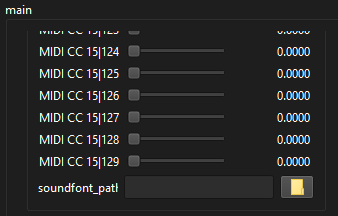
image

Sushi stderr will also complain about it:

fluidsynth: error: No SoundFont with id = -1
fluidsynth: error: There is no preset with bank number 0 and preset number 0 in SoundFont -1

This one also feels really tricky. I could do manual detection / restore of properties that were set that way. But there is close to no documentation about how elk-plugin-extensions and ParameterController.SetPropertyValue() do work together. Also, as far as I know SetPropertyValue does not return an AsyncCommandResponse so any attempt to handle automatic property restoring would be brittle since there would be no way to know about the underlying task success / completion state. This is why I kinda expected SessionController to handle this as I understand that it manages asynchronous jobs better. But I may be wrong there too.